Controls, UI and what the screens show
Controller support on Steam, what the interface is called in the studio's writing, and which parts of the HUD have actually been shown in public.
Steam lists full controller support and DualSense support, and the game is single-player only. Interface language from the studio: Timeline, Synapse, Jewels, Sigils, Traits, Actions and Neura charges.
Last checked: 28 October 2026 — Steam store fields and the trailer battle screen.
Steam says full controller support and DualSense support. The interface itself has been shown once, for about two seconds, and it is more informative than the store page.
What Steam guarantees
| Field | Value |
|---|---|
| Single-player | Yes |
| Full controller support | Yes |
| DualSense Controller Support | Yes (listed in the category set) |
| Steam Input | Not separately listed — support is native |
| Keyboard and mouse | Supported by default on a PC store page |
| Online features | None listed |
"Full controller support" has a specific meaning on Steam: the game can be played start to finish with a pad, including menus. That matters here because a planning interface with seven slots and an action menu is exactly the kind of screen that gets shipped mouse-only by accident.
DualSense support suggests adaptive trigger or haptic use rather than mere button mapping, though the studio has not described what it does with the pad.
The interface, by name
The studio's own vocabulary is consistent across its site, and it is worth learning before launch because these words are what the UI will use:
| Term | What it refers to |
|---|---|
| Timeline | The shared queue of the next seven turns |
| Synapse | A party action resolved before the queue starts |
| Actions | The moves a Neoran brings to the queue |
| Jewels | Passive team-wide artefacts, forged by Iris |
| Sigils | Modifiers attached to a single action |
| Traits | Passive properties, some global |
| Neura charges | The resource Synapse actions consume |
| Baseline Form | The earlier stage of an evolving creature |
What the battle screen shows
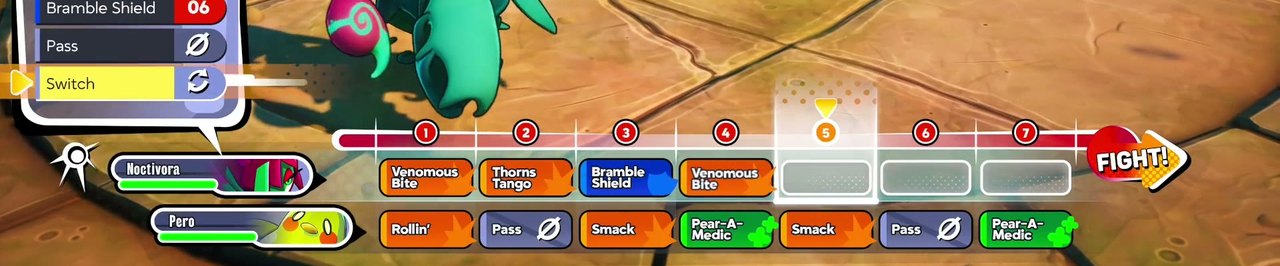
From the only public frame of combat, at about 0:18 in the trailer:
- A party column down the left with creature nameplates and health.
- A numbered queue across the bottom, slots 1 to 7.
- An action menu with named abilities: Venomous Bite, Thorns Tango, Bramble Shield, Rollin', Smack, Pear-A-Medic.
- Two universal verbs: Pass and Switch.
- A FIGHT! button to commit.
That is a dense screen: five party members, seven queue slots, and an action list, all visible at once. On a large monitor it is fine. On a Steam Deck it is the single biggest open question about the game — see the Deck page for why that matters.
The dialogue interface
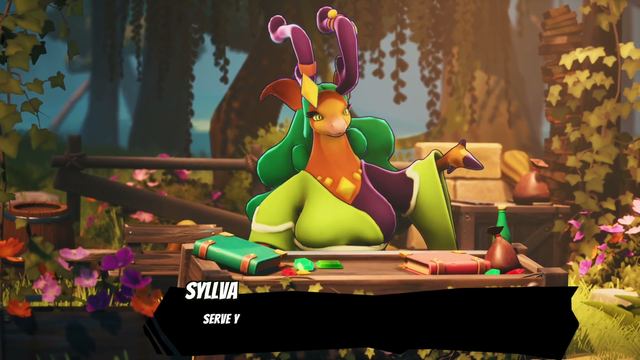
The one screenshot with UI on it shows a simple nameplate plus dialogue text, overlaying the scene rather than cutting to a separate conversation screen. That is consistent with the design's emphasis on creatures being present in the world: you talk to them where they stand.
The trailer also shows a confirmation dialog over a battle — a yes/no prompt asking whether you are sure about the plan. That is the only other interface element visible anywhere in public material.
What has not been shown
| Element | Status |
|---|---|
| Map screen | Not shown |
| Inventory | Not shown |
| Jewels screen | Not shown |
| Creature detail sheet | Not shown |
| Run summary or hub | Not shown |
| Settings or accessibility options | Not shown |
| Key bindings | Not published |
Anyone claiming a specific button layout in 2026 is guessing. What is safe to assume: pad-first, seven-slot planning, and a confirmation step before a plan commits.
Next
- The seven-turn timeline — what those seven slots do.
- Steam Deck status — the screen-size question.
- Combat flow — the interface in the order you use it.